










Worldox - Effortless Document and Email Management

Features of Worldox
Worldox GX4 was designed as a matter-centric document management system, built around mandatory profiling, secure indexing, and strict access controls. The features below represent the core architecture firms continue to rely on today.
Expert Support for Legacy Worldox GX4
Navigate the End-of-Life of Worldox with Australia’s Leading Platinum Partner.
We understand that not every firm is ready to move to the cloud immediately. We provide expert managed IT services to keep your on-premise Worldox environment secure and high-performing.
Don't Get Left Behind in the Worldox Sunset.
We provide the legacy support you need to migrate to a cloud future.
Contact Us Today!Indexer Optimisation
We provide ongoing maintenance and tuning of the Worldox indexing engine to ensure consistent performance at scale.
Active Profiling & Metadata
We maintain and optimise Worldox’s Client/Matter metadata for 100% findability.
Unique Document IDs
Maintenance of the permanent, sequential ID (8-digit numeric characters) system that ensures document integrity and provides a bulletproof audit trail.
Legacy Integration Support
Expert troubleshooting for Worldox “hooks” in Microsoft 365, Outlook, and Adobe Acrobat. WorkZone Drop-Target for dragging emails from Outlook and QuickSave the green icon in Word/Excel.
Why Migrate to NetDocuments in 2026?
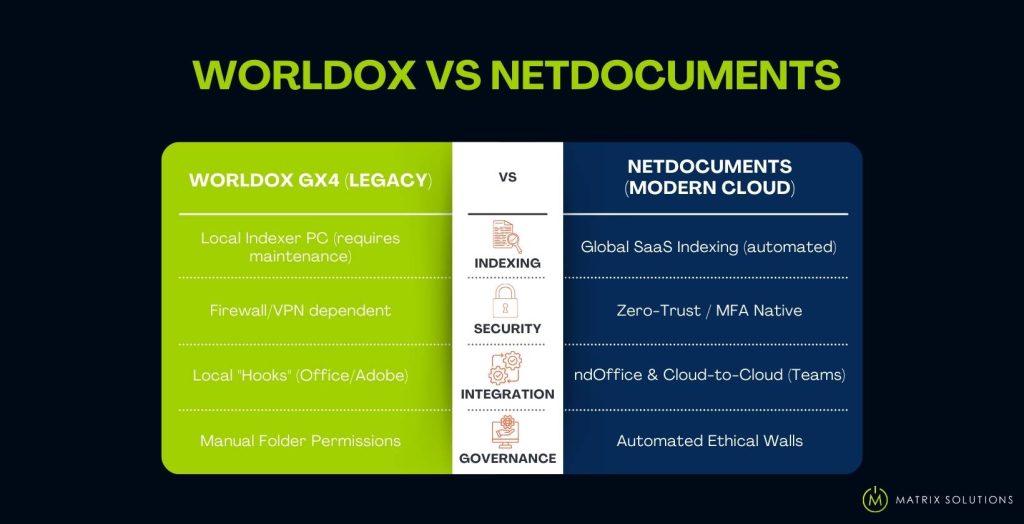
1. Advanced Information Governance & Ethical Walls
NetDocuments offers “government-grade” security with built-in Ethical Walls and security inheritance. It allows you to restrict sensitive matter access by user or group automatically.
2. Zero-Trust Security & MFA
Protect your firm from ransomware with native Multi-Factor Authentication (MFA) and SOC 2 Type 2 compliance. Unlike Worldox, which is vulnerable to local network threats like Cryptolocker, NetDocuments protects your data with enterprise-level encryption and redundant backups.
3. True Mobility (No VPN Required)
Replace clunky RDP and VPN connections with a seamless web-based interface. NetDocuments provides a seamless experience across Windows, Mac, iOS, and Android. Access your entire document library from a browser, tablet, or smartphone with the same speed and security as the office.
4. Native Microsoft Teams & AI Integration
While Worldox struggles with modern collaboration, NetDocuments integrates natively with Microsoft Teams. Use the power of PatternBuilder MAX to use legal-specific AI for document drafting and matter summarisation.
Quick Comparison: Worldox vs NetDocuments
Why Matrix Solutions for Worldox-to-NetDocuments?
As a NetDocuments Platinum Partner, Matrix Solutions is the designated transition team for Australian law firms. We provide the legacy support you need to stay stable in 2026.
-
Award-Winning Platinum Expertise
-
We Preserve Your “Information Legacy’’
Matrix Solutions isn’t just a reseller; we were awarded the NetDocuments APAC Implementation Partner of the Year. Meaning, you are getting a verified, top-tier implementation team that has successfully moved hundreds of Australian firms out of the Worldox ecosystem.
The biggest fear in migration is losing 20 years of metadata. We specialise in metadata mapping to ensure Worldox Profile Fields (Client, Matter, Doc Type) and existing document identifiers transfer accurately into NetDocuments attributes. Your search experience in the cloud will be familiar, but significantly faster.
-
“Bilingual” Support Teams
-
Managed Security & Australian Compliance
Most cloud consultants don’t understand how the Worldox Indexer or GX4 “hooks” work. Our engineers are experts in both platforms. During your transition, we can troubleshoot your legacy Worldox environment while simultaneously building your new NetDocuments workspace. There is no “support gap” where your firm is left in limbo.
Moving to the cloud raises questions about the Australian Privacy Principles. As a Managed IT Security provider, we ensure your NetDocuments setup is configured for Australian data residency. We implement the Ethical Walls and Multi-Factor Authentication (MFA) required to meet 2026 compliance standards for law and finance.
FAQs on Worldox
Is Worldox being discontinued in 2026?
Worldox GX4 is in long-term maintenance mode, with innovation now focused on NetDocuments. Although it’s stable, firms are encouraged to plan a migration to NetDocuments before the 2026 maintenance cycle concludes.
Can I migrate my Worldox version history to the cloud?
Yes. We help you preserve your unique document IDs, full version history, and mandatory metadata profiling, ensuring continuity and auditability in NetDocuments.
Why should I migrate to Netdocuments?
Because NetDocuments is now the platform receiving ongoing innovation, security investment, and compliance development. Matrix Solutions provides specialised Worldox Indexer support and NetDocuments migration services to ensure data integrity during this transition.
How much does it cost to migrate from Worldox to NetDocuments?
Migration costs vary based on the volume of data and the complexity of metadata mapping. In 2026, firms must factor in the “Sunk Cost” of maintaining aging on-premise servers versus the predictable per-user subscription of NetDocuments.
Can NetDocuments replicate the Worldox "Save" and "Open" workflow?
Yes. Through ndOffice, NetDocuments provides a seamless integration with Microsoft 365 and Adobe that replicates the Worldox “pop-up” profiling experience. It maintains mandatory tagging for Client and Matter codes while adding modern efficiencies like predictive filing and real-time co-authoring that legacy systems cannot support.
Featured Resources

Managed IT Solutions Info Pack
Matrix Solutions provides tailored hosted desktop and network management solutions to professional firms.
-
Customer service automation
-
Personalized email campaigns
-
Landing page creation

Cloud Security Check List
Enhance your online security with Matrix Solutions’ Cyber Security Checklist resources. Protect your digital assets effectively.
-
Enhanced engagement
-
User-generated content
-
Competitive advantage

Cyber Security Check List
Strengthen your cloud security with Matrix Solutions' Cloud Security Checklist resources. Safeguard your data effortlessly.
-
File sync and sharing
-
Automatic backup
-
File recovery